How Does ReplicaSet Manage Pods?
Standalone pods are like orphans. Nobody cares even if they die. Your application will be unavailable if the pod dies.
On the other hand, pods managed by a ReplicaSet have a much better life. If for some reason they die, ReplicaSet will launch a new identical Pod. This ensures your application is available all the time.
But how does a ReplicaSet know which pods to manage so that it can restart a pod when required or kill the pods that are not needed?
A ReplicaSet uses labels to match the pods that it will manage.
Example
Consider the following ReplicaSet:
Here’s what happens when you apply the manifest to create the ReplicaSet:
- The
ReplicaSetcontroller checks for pods that match the labels defined in thematchLabelsfield of theReplicaSetmanifest. (app=nginxortier=backend) - If such a pod is found then the
ReplicaSetcontroller checks if the pod is already managed by another controller such as aReplicaSetor aDeployment. (ownerReferencesfield in the pod manifest can be used to find the owner of the object.) - If the pod is not managed by any other controller, the
ReplicaSetwill start managing the pod. Subsequently, theownerReferencesfield of the target pods will be updated to reflect the new owner’s data (TheReplicaSetin this case). - The
ReplicaSetwill also launch new pods if needed to maintain the stable set of replicas defined in theReplicaSetmanifest and update theownerReferencesfield of those pods.
Here's a visual representation of the flow described above:
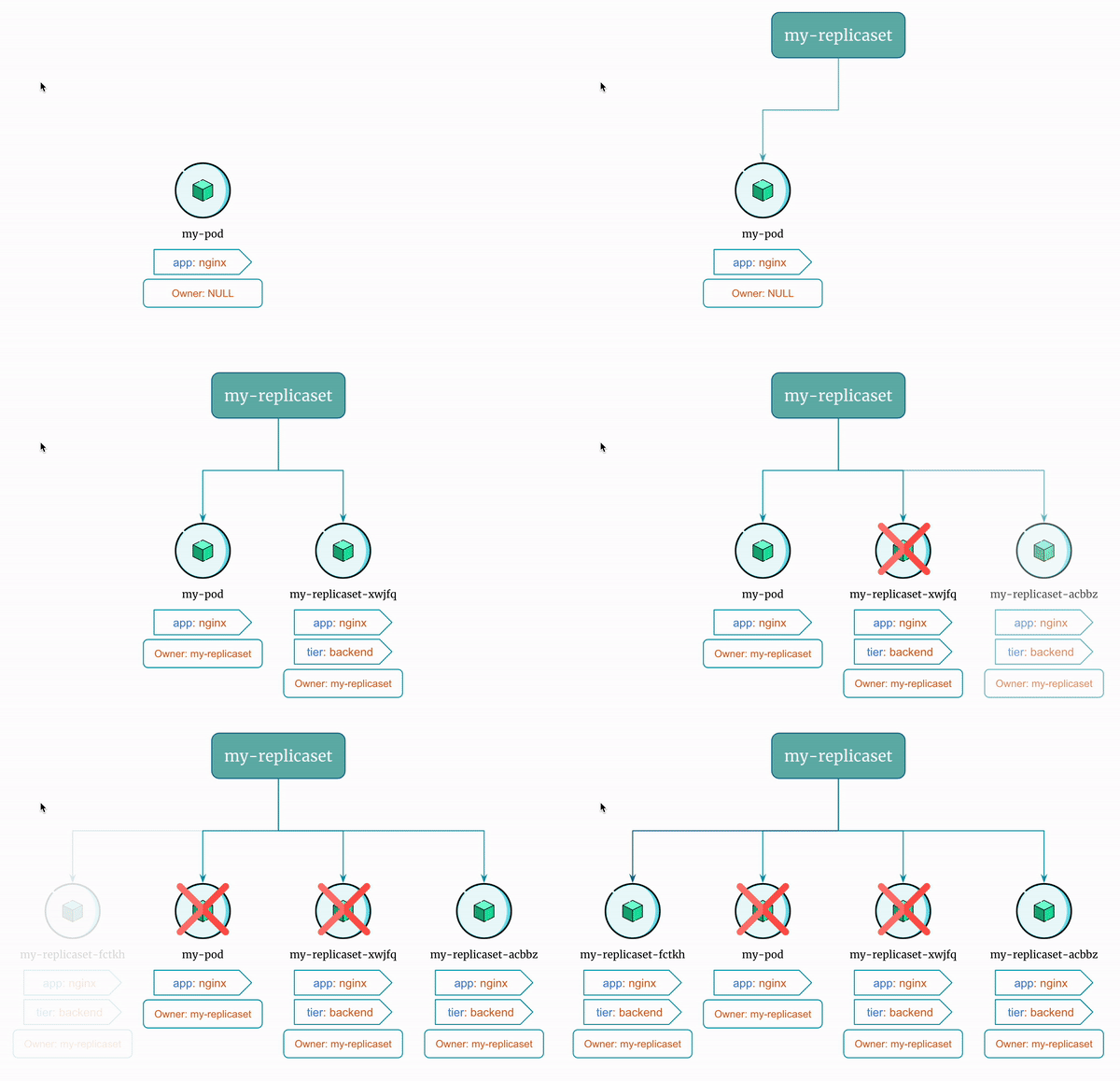
Let's see this in action!
Here is the Docker Image used in this tutorial: reyanshkharga/nginx
Step 1: Create a Standalone Pod
First, create a standalone pod as follows:
Apply the manifest to create the pod:
List pods to verify that the pod is running:
Verify that the pod doesn't have ownerReferences field in the metadata. You can do so by retrieving the detailed information about the pod and output in YAML format as follows:
Step 2: Create a ReplicaSet
Let's create a ReplicaSet as follows:
Apply the manifest to create the ReplicaSet:
Step 3: List Pods
Let's list all the pods:
You'll notice that only one new pod comes up even though replica is set to 2 in the ReplicaSet definition.
This is because my-pod has the label app: nginx that the ReplicaSet uses to manage pods. And it has no owner.
Therefore, the ReplicaSet starts managing my-pod and creates a new pod to maintain 2 replicas as defined in the ReplicaSet manifest.
Also, the ReplicaSet adds a ownerReferences metadata to my-pod that indicates that my-replicaset is the owner of the pod my-pod.
Verify that my-pod has a ownerReferences field in the metadata as follows:
Verify the same for other pod that was created by my-replicaset.
Step 4: Delete Pods
Now, let's see what happens when we delete one of the pods managed by the ReplicaSet.
Delete a pod:
ReplicaSet will launch a new pod using the template defined in the ReplicaSet definition.
Now, let's delete the pod my-pod:
ReplicaSet will again launch a new pod using the template defined in the ReplicaSet definition to maintain 2 replicas.
Important Note
In real world you rarely create a standalone pod. pods are usually managed by a ReplicaSet or a Deployment object in kubernetes.
The idea of ReplicaSets is to manage identical Pods.
But standalone pods may be associated with ReplicaSets if it has labels that the ReplicaSet uses to manage pods even though the standalone Pod is an entirely different application.
So, even if you create standalone pods, make sure that it doesn't have a conflicting labels.